Bring your users back when the people and conversations they care about become active.
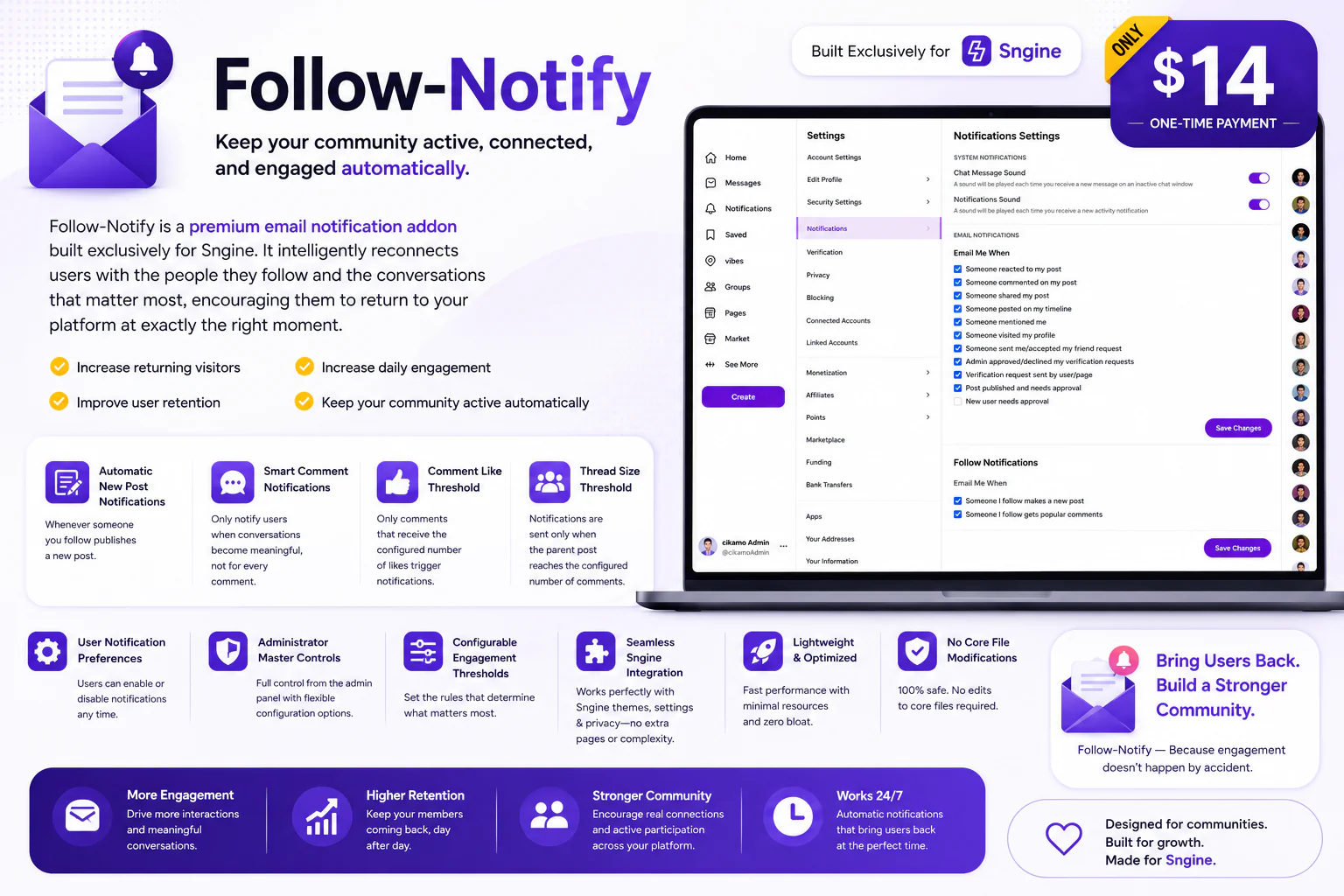
Follow-Notify is a premium email engagement addon built exclusively for Sngine. It automatically emails your users when someone they follow publishes a new post, and can notify them when discussions become popular based on configurable engagement thresholds.
Instead of waiting for members to remember to visit your website, Follow-Notify gives them a reason to come back.
You need Sngine for this addon to work. If you don't already have Sngine, you can purchase it from Codecanyon here: Buy Sngine on Codecanyon
Overview
Social communities often lose engagement simply because users don't know when something interesting happens. A person may follow a creator, friend, or other member but never return to your website because they don't know a new post has been published.
Follow-Notify solves this by automatically sending email notifications that bring members back when the people they follow publish new content or when discussions reach meaningful levels of activity.
✔ Increase returning visitors
✔ Improve user retention
✔ Increase post engagement
✔ Increase discussion activity
✔ Keep your community active automatically
Automatic New Post Notifications
Whenever someone a user follows publishes a new post, Follow-Notify automatically sends that follower an email notification.
This gives users a direct reason to return to your website and discover new content from the people they already chose to follow.
For example, instead of a follower having to remember to check your website, they can receive an email letting them know that someone they follow has published something new.
Smart Discussion Notifications
Follow-Notify can also notify users when conversations become genuinely active. Rather than sending an email for every single comment, the addon uses configurable engagement thresholds to determine when a discussion is important enough to notify users about.
This helps reduce unnecessary emails while giving popular conversations additional visibility.
Comment Like Threshold
Administrators can configure the minimum number of likes a comment must receive before it becomes eligible for a notification.
For example, if the threshold is set to 5 likes, comments with fewer than 5 likes will not trigger a popular-comment notification.
Thread Activity Threshold
Administrators can also configure how many comments a parent post must receive before a discussion becomes eligible for notification.
This means Follow-Notify can focus on conversations that have generated genuine activity instead of sending emails about isolated comments.
Smart Engagement Filtering
Follow-Notify combines the configured engagement thresholds to determine when a discussion has become meaningful enough to notify users. This gives administrators control over how frequently popular discussion emails are generated.
Email Notifications
Follow-Notify uses email to reconnect members with your community. Notifications are generated automatically in the background, helping your users discover new posts and active discussions without requiring them to constantly check your website.
Notification Settings & Controls
For Users
Location:
Settings & Privacy → Notifications
For Administrators
Location:
Admin Panel → Settings → Notification Settings
Automatic Background Processing
Follow-Notify processes notifications automatically in the background using scheduled cron jobs. Once cron is configured correctly, the addon can continuously check for new posts and qualifying discussions without requiring administrators to manually trigger anything.
Requirements
Follow-Notify is built exclusively for Sngine and requires the following:
Installation & Setup
The included guide walks you through the complete setup process, including:
The setup is designed to be straightforward so you can get Follow-Notify running safely and correctly from the first installation.
Seamless Sngine Integration
Follow-Notify integrates directly with Sngine's existing user system, Settings & Privacy pages, Admin Panel, and email functionality.
There is no separate member dashboard or external notification system for users to learn. Follow-Notify works alongside your existing Sngine installation and keeps the experience familiar to your members.
Lightweight & Optimized
Follow-Notify is designed to perform its notification processing in the background, keeping the main user experience lightweight while allowing your community to receive timely email notifications.
No Core File Modifications
Follow-Notify is designed to work without modifying Sngine's core files, making it easier to install, maintain, and update alongside your Sngine website.
Why Follow-Notify?
Your users already told you who they care about by following them. Follow-Notify turns those relationships into opportunities for engagement.
When someone they follow posts something new, let them know.
When a discussion becomes popular, bring them into the conversation.
Give your members a reason to come back — automatically.
✔ Turn followers into returning visitors
✔ Give new posts more visibility
✔ Highlight active discussions
✔ Reduce unnecessary notification emails with thresholds
✔ Increase community engagement
✔ Keep members connected automatically
Key Features
Live Demo
Demo URL:
https://test.cikamo.com
Admin Test Account
Email: [email protected]
Password: Test17#
User Test Account
Email: [email protected]
Password: Test17#
You can as well register another account with your email to test
Documentation
view here
Support
Need help with installation, configuration, or want custom work done on this addon? Feel free to contact me.
Email:
[email protected]
WhatsApp:
+2349136247894
Changelog
Version 1.0
Keep Your Community Coming Back
Automatic • Intelligent • Engaging • Lightweight • Built Exclusively for Sngine