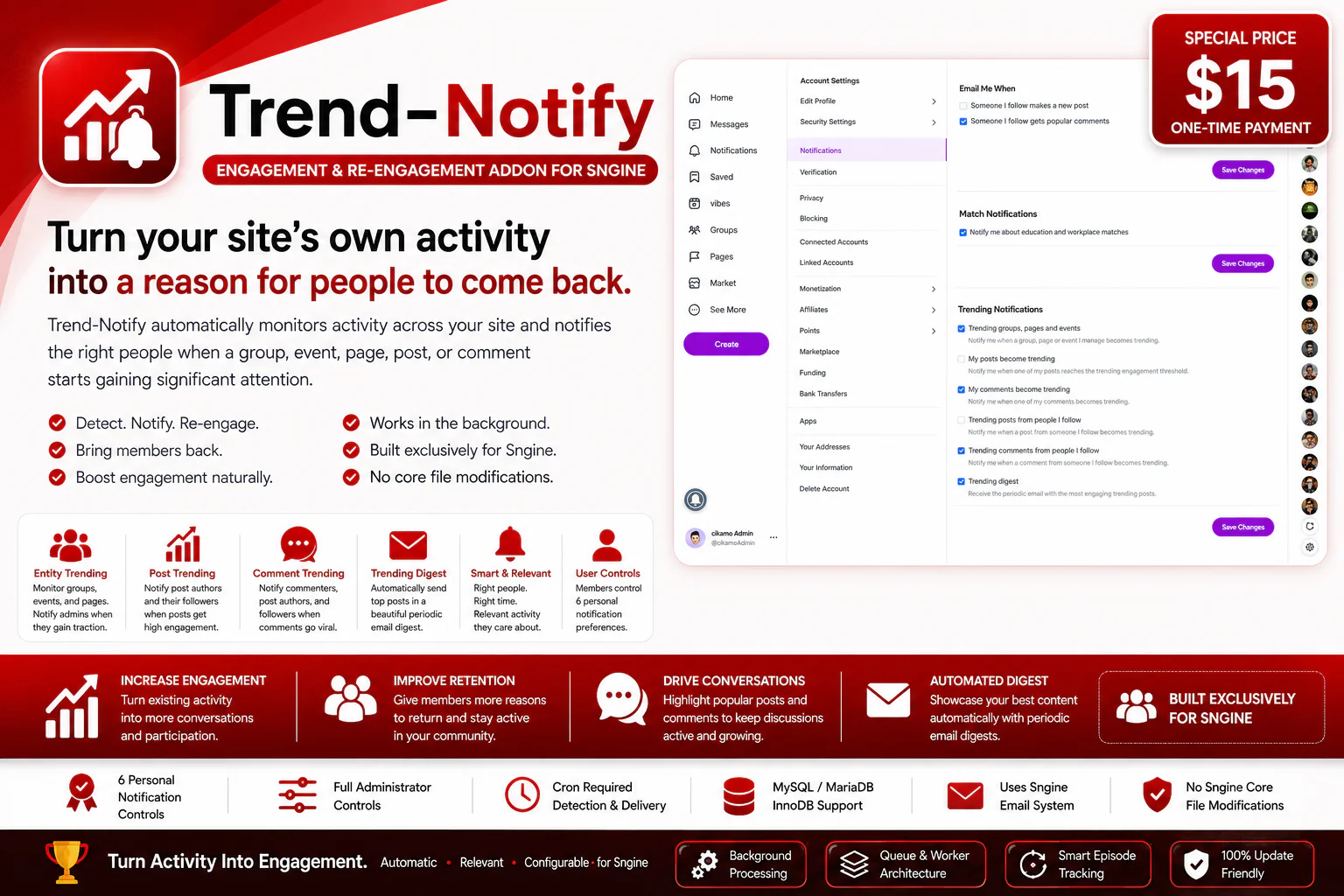
Turn your site's own activity into a reason for people to come back.
Trend-Notify is a powerful engagement and re-engagement addon built exclusively for Sngine. It automatically monitors the activity already happening across your website and notifies the right people the moment a group, event, page, post, or comment starts gaining real attention.
You need Sngine for this addon to work. Trend-Notify is designed to work with Sngine's existing users, groups, events, pages, posts, comments, reactions, followers, notification system, and email configuration. Buy Sngine from Zamblek
Your community is already creating activity every day. Groups are gaining members, events are receiving RSVPs, pages are getting likes, posts are receiving reactions and comments, and conversations are becoming more active.
Trend-Notify turns those everyday moments into timely opportunities for re-engagement.
Instead of waiting for members to stumble across popular content on their own, Trend-Notify automatically identifies important activity and brings it straight to the attention of the people most relevant to it.
When a group starts gaining traction…
Trend-Notify notifies its administrator: "Your group [Group Name] is trending — activity has picked up and more members are joining."
When a member's post starts receiving significant engagement…
The author is notified: "Your post is trending — people are reacting and joining the conversation." Their followers are notified too: "[Name], someone you follow just posted something that's trending right now."
When a comment becomes highly active…
Trend-Notify notifies the commenter, the original post author, and relevant followers: "A comment you're connected to is trending."
When your site has accumulated great posts…
Trend-Notify automatically sends a digest featuring your site's top content: "Here's what's trending on [Your Site] this week — catch up on the conversations you might have missed."
Together, this creates a natural engagement loop that runs entirely on the content and activity your community is already producing — no extra work required from you or your members.
How Trend-Notify Works
Trend-Notify works automatically in the background using scheduled processing. It scans your site's existing activity, compares it against administrator-defined thresholds, queues qualifying notifications, and processes those notifications through dedicated workers.
1. Your Site Creates Activity
Members join groups, RSVP to events, like pages, publish posts, react, comment, and interact with one another — exactly as they normally would.
2. Trend-Notify Detects Significant Activity
Scheduled scans compare current activity levels against the thresholds and settings configured by the administrator.
3. A Trending Event Is Identified
When a group, event, page, post, or comment reaches the configured conditions, Trend-Notify flags it as trending.
4. The Appropriate People Are Selected
The addon determines exactly who should be notified based on the type of trending activity detected.
5. Notifications Are Queued
Qualifying notifications are placed into dedicated queues, so detection and delivery are handled separately for reliability.
6. Notifications Are Delivered
Worker processes drain the queues and send the appropriate notifications and emails using your site's existing Sngine email configuration.
Entity Trending
Trend-Notify monitors groups, events, and pages and notifies their administrators the moment they reach an administrator-defined popularity threshold.
This means administrators no longer need to constantly check their community statistics by hand — Trend-Notify does the watching for them.
When an entity crosses its configured threshold, Trend-Notify lets its administrator know the community is gaining real traction, for example:
"Your group is trending — your community has reached the configured activity threshold."
Post Trending
Posts become more valuable as people react to and participate in the conversation around them.
Trend-Notify monitors post engagement using administrator-defined thresholds for likes/reactions and comments.
When a post reaches its trending conditions, Trend-Notify can notify:
This gives the author a timely reason to return to their own content, while giving followers a reason to revisit a conversation that's gaining attention.
Comment Trending
Sometimes the most engaging part of a post is the conversation happening underneath it.
Trend-Notify monitors comment reactions and identifies comments that reach the administrator-defined reaction threshold.
When a comment starts trending, notifications can be sent to:
Comment trending counts reaction activity across all reaction types supported by your site, rather than assuming only a single "like" reaction exists — making the feature fully compatible with Sngine installations using custom or multiple reaction types.
Trending Digest
Trend-Notify also includes a periodic Trending Digest that automatically rounds up your site's strongest posts into a single, well-organized email.
Instead of manually curating content every week, the addon evaluates post activity and ranks posts using an administrator-configurable combination of reactions and comments.
Administrators can control:
The result is an automated content roundup that gives members another reason to open an email from your website and rediscover what's been happening across the community.
Smart Trending Episode Tracking
Trend-Notify doesn't permanently treat an item as "already notified" after its first threshold crossing.
For entity, post, and comment trending, the addon actively tracks whether an item is currently in a trending state.
If an item crosses its threshold, a notification can be triggered. If its activity later falls back below the threshold, that trending episode ends. If the same item crosses the threshold again later, Trend-Notify recognizes it as a new episode and can trigger another notification.
This allows trending notifications to respond to renewed activity, instead of permanently limiting each item to a single one-time alert.
Configurable Lookback Windows
Trend-Notify provides administrator-controlled lookback windows for both post and comment trending.
These settings determine the period of activity considered when evaluating whether posts and comments have reached their configured trending conditions — giving site owners precise control over how recent activity should influence trending detection.
Threshold-Based Detection
Trend-Notify uses administrator-defined thresholds rather than assuming every Sngine site has the same activity level.
Administrators can configure thresholds for:
Thresholds can be adjusted to match the size and activity level of your own community.
Important: Trending thresholds are compared against raw activity counts within the configured conditions, not against engagement rates or velocity. A post that accumulates engagement gradually can therefore reach the same threshold as one that receives a sudden spike.
Digest Ranking & Scoring
The Trending Digest ranks posts using an administrator-configurable scoring model based on reactions and comments.
Digest Score = (Reactions × Reaction Weight) + (Comments × Comment Weight)
This lets administrators decide how much influence each type of engagement should have when determining which posts deserve a spot in the digest. A community focused on discussion can weight comments more heavily, while another may prefer reactions to carry more influence.
Who Gets Notified?
Trend-Notify is designed to send each type of notification to the people most relevant to that specific activity.
Entity trending: The entity's administrator(s).
Post trending: The post author and the author's followers.
Comment trending: The commenter, the original post author, and the commenter's followers.
Trending digest: Users who have opted in to receive the digest.
Six Personal Notification Controls
Every member can control their own Trend-Notify notification preferences from the user notification settings.
Users who have never saved their Trend-Notify preferences default to receiving these notification types, while still retaining full control to change them at any time.
Administrator Controls
Trend-Notify provides a dedicated administrator settings system for controlling how the addon behaves across the entire site.
Administrators can control:
Sitewide switches always take priority over individual user preferences. If an administrator disables a notification type across the site, that notification type will not be sent — even if an individual user has it enabled.
Background Processing
Trend-Notify is designed to work quietly in the background through scheduled processing.
Detection and delivery are separated into cron and worker processes. Cron processes scan activity and build notification queues, while worker processes drain those queues and handle delivery.
This architecture keeps activity detection separate from email delivery and allows the addon to process notifications in controlled, manageable batches.
Queue-Based Architecture
Trend-Notify uses dedicated queues for its different notification systems, including entity, post, comment, and digest processing.
A combined worker is also available for post and comment queues, allowing those two notification systems to be processed by a single worker when desired.
This queue-and-worker architecture is built for reliable background processing, rather than attempting to perform all notification delivery during a single activity scan.
Uses Sngine's Existing Email System
Trend-Notify does not require a separate SMTP service or additional email configuration.
It uses the email configuration already provided by your Sngine installation. If your Sngine website is already configured to send email successfully, Trend-Notify can use that same configuration for its notification emails and trending digest — no extra setup needed.
Editable HTML Email Templates
Every Trend-Notify email is built from an editable HTML template, keeping presentation cleanly separated from notification logic.
Included templates cover:
The templates use simple {{placeholder}} values that are filled in automatically when an email is generated — so you can restyle the email layouts in a normal text editor without touching a single line of PHP notification logic.
Seamless Sngine Integration
Trend-Notify is built entirely around Sngine's existing systems rather than creating duplicate systems of its own.
It works with Sngine's existing users, groups, events, pages, posts, comments, reactions, followers, notification system, settings architecture, and email configuration.
There's no separate member dashboard, no separate messaging system, and no separate content platform to learn — everything happens inside the Sngine experience your members already know.
No Sngine Core File Modifications
Trend-Notify operates as a fully standalone addon and keeps all of its functionality inside its own addon structure.
It does not require modifications to Sngine core files, which keeps your main Sngine installation clean and makes the addon easy to maintain alongside future Sngine updates.
Built for Different Community Sizes
Every Sngine community has a different activity level.
A small community might consider 10 comments on a post highly significant, while a much larger network may need a far higher threshold before something counts as "trending."
Trend-Notify lets administrators define their own thresholds and scoring values instead of forcing every website to share the same definition of trending — so as your community grows, your notification rules can grow right along with it.
Why Trend-Notify?
Your members are already creating the engagement your website needs. The problem is that activity alone doesn't automatically bring people back.
Trend-Notify builds the bridge between activity and re-engagement.
A post starts getting attention → the author is notified → followers can be notified → members return → the conversation gets another chance to grow.
A comment becomes popular → the people connected to that conversation can be notified → they return → more discussion follows.
A group, event, or page gains traction → its administrator is notified → they return and engage with their growing community.
Your site has accumulated great posts → the digest automatically brings selected content back into members' inboxes.
Turn Activity Into Engagement
Trend-Notify doesn't need to invent new reasons for your members to return — the reasons are already happening on your website.
Your community creates the activity. Trend-Notify identifies the moments that matter. Then it brings those moments straight to the people most likely to care.
Key Features
Requirements
Trend-Notify is built as a standalone Sngine addon and uses Sngine's existing systems for users, content, reactions, notifications, and email.
Important: Trend-Notify monitors your site's existing activity. It does not create a separate content system or require members to submit content to a special trending section.
Why Trend-Notify?
Every active community produces moments worth bringing back to people's attention:
A group starts growing. An event begins attracting people. A page reaches a new level of attention. A post becomes popular. A comment becomes part of an important conversation. Your site builds up a collection of posts that deserve another look.
Trend-Notify automatically turns every one of those moments into a re-engagement opportunity.
✔ Turn existing activity into automated engagement
✔ Notify members when content they care about starts trending
✔ Help administrators discover growing groups, events, and pages
✔ Bring authors back to their increasingly popular posts
✔ Bring followers back into active conversations
✔ Highlight popular comments and discussions
✔ Automatically showcase top posts through a periodic digest
✔ Give administrators complete control over thresholds and notification types
✔ Give members control over their personal notification preferences
✔ Keep notification processing automated in the background
✔ Work with your existing Sngine email infrastructure
✔ Keep your Sngine core files untouched
Seamless, Automated Re-Engagement
Trend-Notify works quietly in the background while your community does what it already does best: create activity.
No manual monitoring. No manual content selection for the digest. No separate notification platform. No Sngine core modifications.
Just automated notifications, built entirely on the activity that's actually happening on your website.
Live Demo
Demo URL:
https://test.cikamo.com
Admin Test Account
Email: [email protected]
Password: Test17#
User Test Account
Email: [email protected]
Password: Test17#
You're also welcome to register your own account with your email to test the notification flow firsthand.
Documentation
View documentation here
Support
Need help with installation, configuration, or want custom work done on this addon? Feel free to reach out.
Email:
[email protected]
WhatsApp:
+2349136247894
Changelog
Version 1.0
Trend-Notify — Turn Your Site's Activity Into a Reason to Come Back.
Automatic • Relevant • Configurable • Built Exclusively for Sngine
Last Update:
Aug 28, 2026 06:39 AM
Published:
Aug 10, 2026 10:46 AM
Version:
v1.0
Category:
Tags: