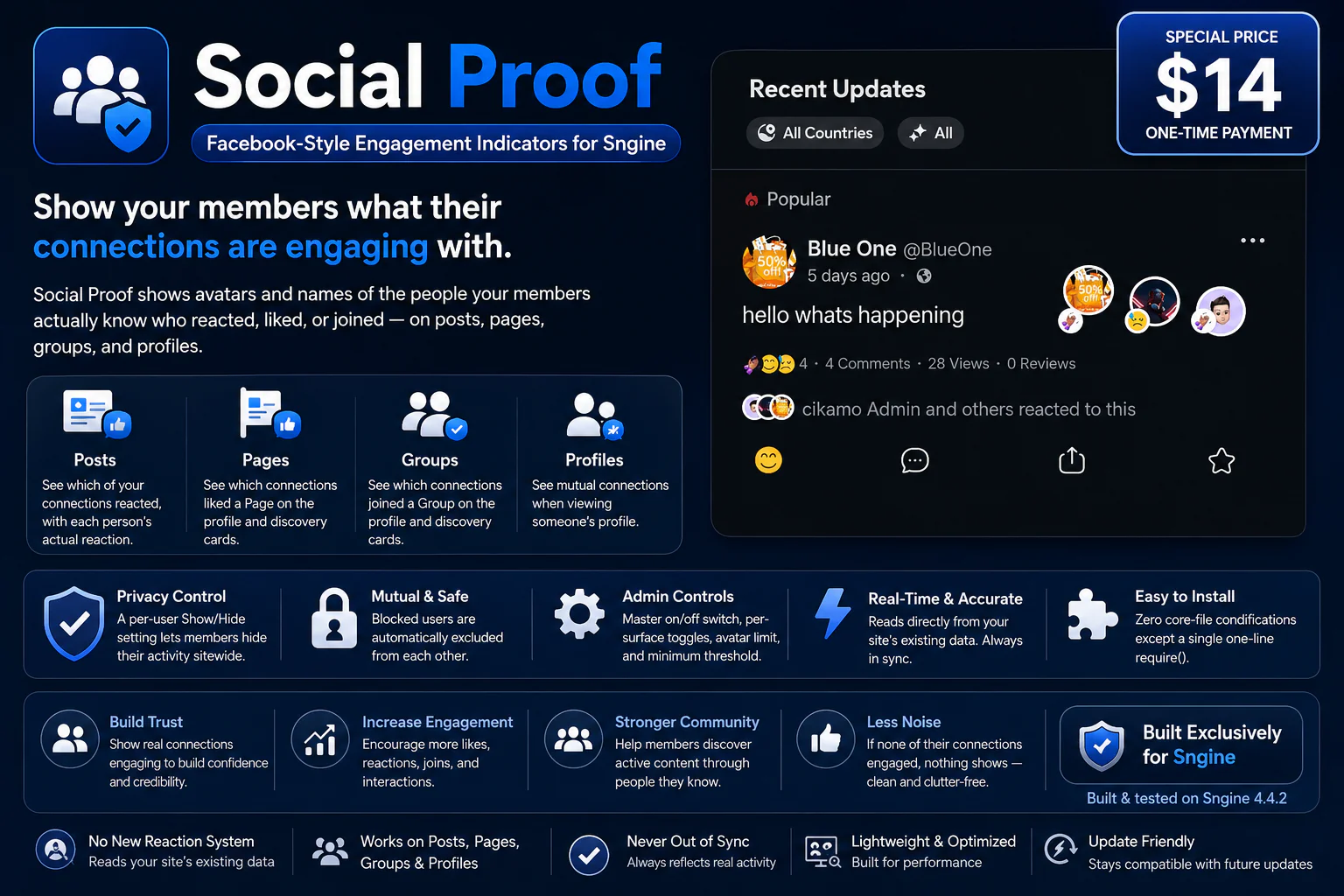
Make your community feel more social with personalized engagement indicators.
Social Proof is a premium engagement addon built exclusively for Sngine. It shows members when people they actually know have engaged with content, Pages, Groups, or profiles — bringing the familiar "friends liked this" experience from platforms like Facebook and Instagram to your own community.
Instead of showing every member the same generic message such as "24 people liked this," Social Proof personalizes the experience for each viewer by showing the people they are actually connected to who reacted, liked, joined, or share a mutual connection.
You need Sngine for this addon to work. If you don't already have Sngine, you can purchase it from official store here: Buy Sngine from zamblek
It turns ordinary engagement into visible social activity and gives members a reason to pay attention to what is happening around them.
How Social Proof Works
Social Proof does not create a new social graph, reaction system, or engagement database. It reads the relationships and engagement data your Sngine website already has and calculates the relevant social overlap for each viewer.
1. The Viewer Opens Content
A member views a post, Page, Group, or another member's profile.
2. Social Proof Determines Their Connections
The addon identifies the people the viewer knows based on the site's existing friendship and following relationships.
When Sngine's Friends system is enabled, this can include:
If Friends are disabled sitewide, Social Proof uses followings instead.
3. Existing Engagement Is Checked
Social Proof then checks Sngine's existing data to determine whether any of those connections interacted with the content or entity being viewed.
4. Privacy Rules Are Applied
Before displaying anything, Social Proof checks the relevant privacy relationships and user preferences.
Users who have opted out of Social Proof are excluded. Blocked users are also automatically excluded from appearing to each other.
5. The Indicator Is Personalized
If relevant connections are found, Social Proof displays their avatars and a short engagement summary. For posts, the actual reaction used by each person can also be displayed.
6. Nothing Is Shown When There Is No Social Connection
If nobody the viewer knows has engaged, Social Proof does not display an empty indicator. There is no unnecessary "0 friends reacted" message — the interface simply remains clean.
Posts
Social Proof shows which of the viewer's connections have reacted to a post.
Instead of a generic:
"24 people reacted to this."
a member can see the people they actually know who interacted with the post.
Each person's actual reaction can be displayed alongside their avatar, including Like, Love, or other custom reactions supported by the site.
Pages
Social Proof shows which of the viewer's connections have liked a Page.
The indicator can appear on:
This allows members to discover Pages through people they already know.
For example:
"David and Sarah like this Page."
with their avatars displayed alongside the indicator.
Groups
Social Proof shows which of the viewer's connections have joined a Group.
The indicator can appear on:
This creates a simple social discovery mechanism:
"3 people you know are members of this group."
Members can immediately see that a Group already has people from their own network.
Profiles
Social Proof also works on member profiles.
When someone views another member's profile, Social Proof can show mutual connections — people the viewer is connected to who are also connected to the profile being viewed.
This provides a familiar social-networking experience and helps members discover relationships they already have in common.
Personalized Social Proof
Social Proof is not a sitewide engagement counter.
The same post can display different social proof to different members.
For example:
David can see Sarah's avatar and reaction.
Another member who does not know Sarah will not see Sarah as part of their Social Proof.
This means every indicator is calculated for the person viewing it.
Privacy First
Social Proof is designed with privacy in mind.
A member can control whether their activity is allowed to appear in Social Proof indicators.
User Privacy Control
Members can choose to show or hide their activity from Social Proof.
When a member disables Social Proof:
Blocked Users
Blocked relationships are automatically respected.
If two users have blocked each other, Social Proof will not expose their engagement to one another through these indicators.
No Duplicate Engagement System
Social Proof does not create a replacement for Sngine's existing engagement functionality.
It reads the data your website already tracks, including:
This means there is no second reaction system to maintain and no duplicate engagement database that can become out of sync.
Your existing Sngine data remains the source of truth.
Fresh Per-Viewer Calculation
Social Proof calculates the relevant information based on the current viewer and the content they are viewing.
The avatars shown beneath a post are therefore not simply a sitewide list of people who reacted.
They represent the people that particular member knows who interacted with that content.
This is what makes Social Proof genuinely social rather than just another engagement counter.
Admin Controls
Administrators have control over how Social Proof operates across the website.
Master Control
Administrators can enable or disable Social Proof globally.
Surface Controls
Administrators can independently control Social Proof for:
This allows site owners to decide exactly where Social Proof should appear.
Display Controls
Administrators can also configure:
This gives administrators control over both the visibility and presentation of the feature.
Why Social Proof?
Most social networks already contain valuable relationship and engagement data. The problem is that much of that information remains invisible.
A post may have hundreds of reactions, but a member may care much more about seeing:
"Your friend Sarah reacted to this."
A Group may have thousands of members, but discovering:
"3 people you know are members."
can be much more meaningful.
Social Proof turns existing engagement into personalized social context.
It helps members:
✔ See what people they know are engaging with
✔ Discover Pages their connections like
✔ Discover Groups their connections have joined
✔ Find mutual connections between profiles
✔ Make engagement feel more personal
✔ Encourage content discovery through existing relationships
✔ Increase the feeling of community and activity
✔ Make your Sngine website feel more alive and social
Key Features
Seamless Sngine Integration
Social Proof is designed to work with the Sngine systems your website already uses.
It does not introduce a separate:
Instead, Social Proof reads the existing relationships and engagement data and presents the relevant information to each viewer.
There is no separate dashboard for members to learn and no additional engagement system to manage.
It works quietly within the existing Sngine experience.
Why It's Safe to Install
No new reaction system
Social Proof reads the reactions your website already records.
No duplicate engagement data
Existing Sngine reactions, likes, memberships, friends, and followings remain the source of truth.
Privacy-aware
User opt-out and blocked relationships are respected when calculating Social Proof.
Minimal core modification
Installation requires only a single one-line require() modification, with the remaining functionality handled by the addon.
Built for Sngine
Social Proof is built and tested specifically for Sngine 4.4.2, 4.5 and newer.
Settings & Controls
For Users
Location:
Settings & Privacy → privacy
For Administrators
Location:
Admin Panel → Settings → System Settings
Requirements
Social Proof is built exclusively for Sngine.
Live Demo
Demo URL:
https://test.cikamo.com
Admin Test Account
Email: [email protected]
Password: Test17#
User Test Account
Email: [email protected]
Password: Test17#
You can as well register another account with your email to test
Documentation
view here
Support
Need help with installation, configuration, or want custom work done on this addon? Feel free to contact me.
Email:
[email protected]
WhatsApp:
+2349136247894
Changelog
Version 1.0
Make Your Sngine Community Feel More Social
Automatic • Personalized • Privacy-Aware • Built Exclusively for Sngine
Last Update:
Aug 28, 2026 06:47 AM
Published:
Aug 14, 2026 11:07 AM
Version:
v1.0
Category:
Tags: